
Letter #85: 2 mistakes to avoid when documenting your workflows and processes
Including one tip to ensure your team actually references your documents

“Who is doing their job in a silo?” Katy Flatt, the Director of Culture and Operations at Optimist, thought to herself when she started documenting her team’s processes.
Katy shares Optimist started from scratch almost seven years ago.
So when they started documenting, there was a lot of ground to cover between:
Checklists
Job descriptions
Brand guidelines
Reference material
Content formatting
Stylization guidelines
Workflow processes
Tool stack walkthroughs
And a lot more
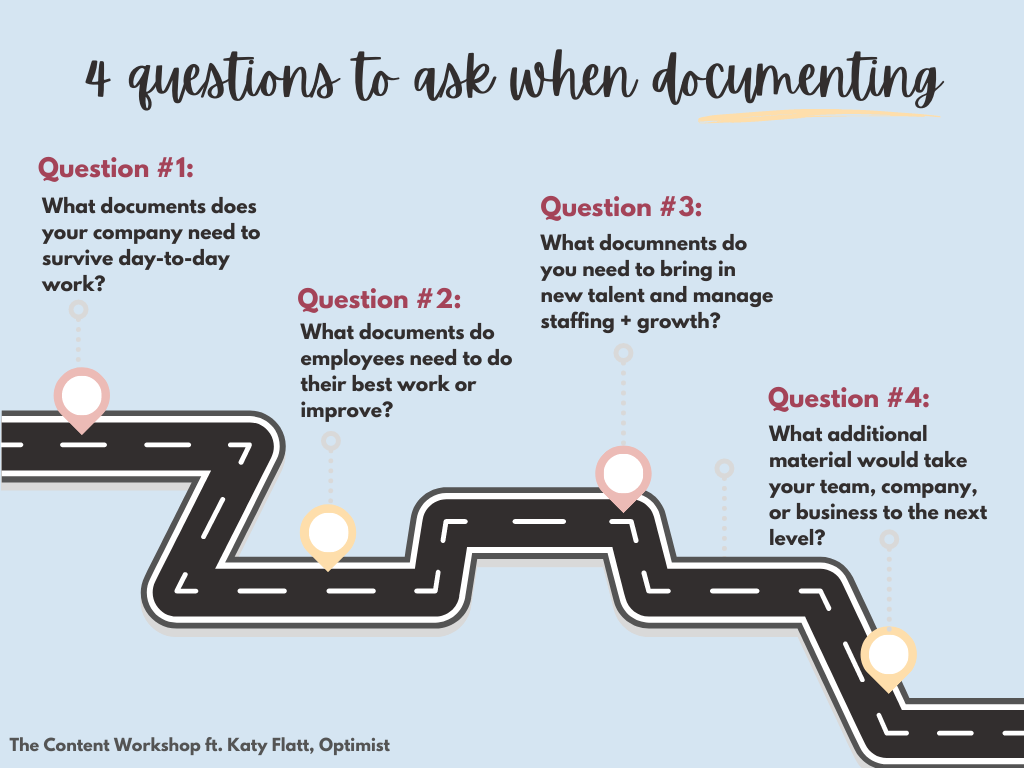
It’s then that she asked this question to navigate their documentation journey.
“At least three of us had unique roles and we had created our own processes and workflows and digital organization for managing our own little arm of the process. So, those processes needed to be documented so that if (perish the thought) one of us left or had an emergency come up, business could continue because we could access these workflows.”
The next question?
“What do existing team members need to do their jobs to the best of their abilities?”
Answering it led to the next batch of documents — onboarding materials, the brand and style guidelines, content playbooks, tool walkthroughs (with exactly how they used each tool), etc.
With the foundation set, Katy focused on:
Next phase priorities (“for us, those were things like job descriptions – prioritized by what roles we actually needed to start looking to fill”)
And, nice-to-haves (“optional professional growth materials such as articles or best practices the team could choose to access”)
In short, to catalog your processes and company info as effectively as Optimist (whose documentation process is among the best that I’ve seen yet), ask yourself the following questions to understand where to get started and what to document:
With that, let’s look at what Katy shared when I asked her our alternate Tuesday questions that we ask all experts:
A mistake Katy made as she set out to document their processes
An actionable tip to get you closer to cataloging things
And a secret tip to effective documentation that all teams love
👉 Learn from Katy’s mistakes: “Trying to get every detail on your first pass is never going to happen.”
This is particularly true if “you’re a company that does a lot of iteration or A/B testing,” Katy points out.
“Something you want to avoid is spending a ton of time on one process or workflow, just to revisit in two months and rewrite the whole thing.”
“Whether you’re starting with a large undertaking or just tackling some new documentation, get your headers and bullets down. You can always go back and polish it up.
It’s like writing anything else – just get something on the paper, you can proof and edit and revise later. Effective communication is better than pretty PDFs. You heard it here first.”
And mistake number 2?
“Sometimes I put too much of my own voice into my documentation. Which, is fine and lovely and we’re a small team and all that, but I do sometimes have to be reminded that not everyone on the team speaks English as a first language, so my cutesy colloquialisms, regionalisms, and idioms may not make for the most clear and helpful instruction.”
👉 Do this today: “Start with yourself.”
“Look at your job and your role and the workflows you’ve created for yourself and ask: What am I doing that others don’t realize or has started saving me a lot of time on X task?”
“You know your job better than anyone. Once you’ve made a few short checklists or a step-by-step guide, then you can start making that larger list I mentioned at the beginning.
Then you can start breaking that down into the individual documents, walkthroughs, and workflows and prioritize based on the needs of your team and the needs of your company or department.”
“As you get rolling, you’ll begin to strike a cadence for how your documentation will be formatted and take advantage of that to make some templates to make the processes even more smooth and standardized.”
👉 The secret tip to creating documentation that gets read: Make it accessible.
“Not everyone learns the same and not everyone absorbs information the same and this is why it’s important to have more than one format when documenting.”
“For example, when I am creating a walkthrough for a tool we use, I create headers and sections and a written step-by-step type approach. But I also include a Loom at the top of that walkthrough the exact same material in the same order. I also include examples, photos, and links to resources through the walkthrough.
This is not to say that all these documents need to be long and exhaustive, they absolutely don’t. Just be thoughtful of accessibility, learning styles, languages, etc.”
So today’s takeaways:
Start by documenting the processes your team needs to do their day-to-day work
Don’t obsess about perfecting documents the first time around, refine over time
Improve accessibility by having a text version as well as a video version of your notes
That’s all, fellas 🙌
Let me know how valuable today’s issue was — even if you’re leaving with one new tip, it’s a win for me :)
P.S. I’m vacationing next week so you won’t hear from me next week and possibly the week after it as I settle back into work mode.
👍🏾